Data Controls Settings
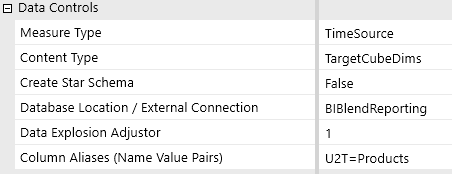
Measure Type
Defines how the time dimension column will be determined in the relational tables. You can choose from the following options:
-
Time Source: The time/amount columns generated in the Blend table are determined by the members in the source data set.
-
TimeWFView: The time/amount columns generated in the Blend table are determined by the Workflow Tracking and Input Frequency set for the workflow scenario. For example, a yearly tracking frequency for a monthly input scenario would create 12 time columns regardless of the number of periods in the data records. This option is used for Time Math helper rules.
-
TimeWFViewAV: Used for matrix loads using Attribute Value and BI Blend Extended Attribute dimensions only. The time/amount columns generated in the Blend table are determined by the Workflow Tracking and Input Frequency set for the workflow scenario. This solution requires time based value records to be associated with Attribute Value Dimension members in the data source. Each value (1-36) is associated with a time period column in the output table. This method efficiently processes records in large multi-period datasets.
Content Type
Determines the record detail that is written to the BI Blend tables. Cube dimensions, such as Entity, Account, and UD, are supported by Source and Target, or transformed, results. You can also include or exclude the attribute or BI Blend Extended Dimensions. The analysis of source against aggregated parents is not supported. You can choose from the following options:
-
TargetCubeDims: Only transformed cube dimension target members columns are imported.
-
TargetCubeDimsSource: Source and transformed cube dimension target member columns are imported.
-
TargetCubeDimsAttributes: Transformed cube target members and attribute members are imported. For example, when data is integrated to Attribute dimensions for non-cube dimension records, such as invoices assigned as an attribute.
-
TargetCubeDimsAll: Source, target, and attribute members are imported.
-
TargetCubeDimsAttributeEx: Transformed cube dimension target members, attribute members, and BI Blend Extended members are imported.
-
TargetCubeDimsAllEx: Source, target, attribute, and BI Blend Extended members are imported.
Create Star Schema
If set to True, a view is created during import based on the aggregation dimension tables. The BI Blend database is generated as a Star Schema table set with related views, which is required for Leveled Hierarchy reporting.
Supporting dimension tables are created for each cube dimension assigned an Aggregation Control. The Dimension tables will contain column fields for MemberName, MemberDesc, NameAndDesc, ParentName, IndentLevel, IsBase, and MemberSeq, which can be used in reporting against the Star Schema view. This is an optional setting.
Database Location / External Connection
The connection to the storage location for the Blend tables. Select the connection name.
Data Explosion Adjuster
The integer value entered controls data explosion and estimates the size of tables generated, as derived from the initial Learning Mode. The default value is one.
Colum Aliases (Name Value Pairs)
This setting enables you to use column aliases to define custom dimension column names in the main Blend table using the stage table keywords. If left blank, the system generates column names based on the default table and dimension labels. This will override aliases set on the cube Integration tab.
Example: V1=OrderQuantity, V2=UnitPrice
Example: This example is for custom label columns for UD dimensions and Attribute Text dimensions: U1T=CostCenter,U2T=Products,U3T=Regions,A1=DepartmentCode,A2=ExpenseID.
Review these column alias keys:
| Dimension | Column Alias Key |
|---|---|
| UD1-UD8 | U1T-U8T |
| Attribute Text Dimension | A1-A20 |
| Attribute Value Dimension | V1-V12 |
| Label | Lbl |
| TextValue | Tv |
| Blend X Attribute | xA1-xA40 |
| Blend X Attribute Value | xV13-xV36 |
NOTE: Alias must be unique. Multiple aliases can be set, separated by a comma. You cannot have spaces in your alias value names, and quotation marks are not required.

